
Set up server crawler tracking
Add optional server tracking to see bots that do not execute your website JavaScript. Website-detected bots and server crawler requests have different coverage and remain separate from human website analytics.
Not published yet. Replace
REPLACE_WITH_PUBLISHED_JELTO_CRAWLER_PACKAGEwith the package address after publication. The prepared import is@jelto/crawler.
Prepare the connection
- Register your public website hostname in Jelto.
- Open Settings → Traffic & usage → Server crawler tracking → Set up server tracking.
- Create a server crawler key with only
crawlers:write. Copy it into your server's secret environment asJELTO_CRAWLER_KEY. It is shown once and must never appear in browser code. - Set
JELTO_API_ORIGINto the main Jelto API origin shown for your setup. A custom script/tracking subdomain does not expose the authenticated crawler API.
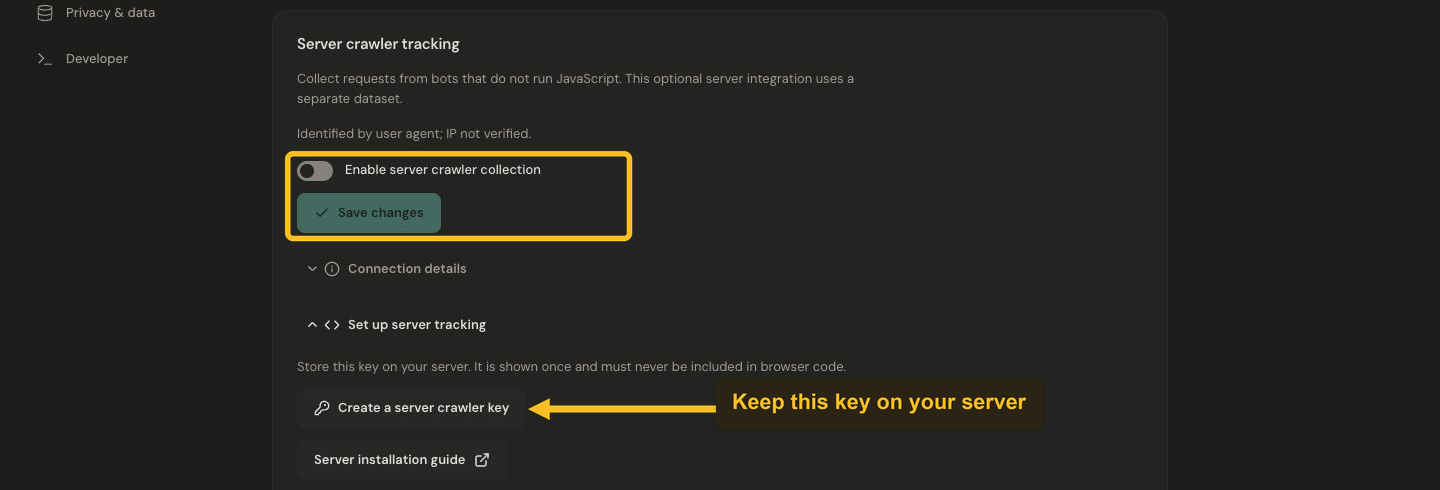
Create a crawlers:write server key, install server tracking, enable collection and verify a real crawler request.
Add server middleware
Install the published package in your own server project after replacing the placeholder:
npm install REPLACE_WITH_PUBLISHED_JELTO_CRAWLER_PACKAGE
Node.js 22 or a Fetch-compatible runtime with Web Crypto and AbortSignal.timeout is required. Initialize one tracker in a server-only module:
import { createCrawlerTracker } from '@jelto/crawler'

const crawlers = createCrawlerTracker({
  endpoint: process.env.JELTO_API_ORIGIN ?? '',
  apiKey: process.env.JELTO_CRAWLER_KEY ?? '',
  publicOrigin: 'https://example.com',
})
After your server has produced its response, call:
crawlers.trackResponse(request, response)
Here request and response are the actual Fetch Request and Response for the page. In middleware without the final response, use trackRequest(request) instead. On a short-lived runtime, pass its context with waitUntil as the third argument to trackResponse. In Node, call await crawlers.flush() during your existing graceful-shutdown flow.
Do not convert arbitrary client headers into a trusted public hostname; configure publicOrigin from your known website origin.
Check, enable and verify
Run this once from your server:
const evidence = await crawlers.check('example.com')
console.log(evidence)
The hostname must match your registered public host. A successful check validates the connection but creates no crawler traffic. Then enable Enable server crawler collection and save in Traffic & usage.
Deploy the middleware and wait for real eligible crawler requests. Refresh Connection details, then read the server source in Bot activity. Do not label a synthetic user-agent test as evidence of a real Googlebot visit.
Coverage and reliability
Only eligible GET/HEAD requests are reported. The tracker filters obvious assets and unrelated API routes; robots, llms text, sitemaps, Markdown and PDF resources can be included. It reads URL, method, user-agent and optional response status, not cookies, authorization, bodies, forwarding headers or IP addresses. Query strings and fragments are removed. User-agent classification is a claim, not identity verification.
A return value from trackResponse only indicates acceptance into the local queue. Flush is best effort; shutdown, queue limits or exhausted retries can lose observations. Do not use this analytics stream as a complete access log.
Crawler usage has its own allowance and billing behavior; see Crawler usage. To stop collection, disable it and remove the middleware. Manage any data deletion through Privacy & data or the crawler deletion controls.