
Choose Jelto if…
- You want website analytics and dedicated desktop reporting together.
- You need to inspect version adoption and returning app installs.
- You have a Plausible site export and want to bring supported historical aggregates with you.
Plausible alternative
Keep the clarity. Add a view of your desktop app.
Plausible gives website owners focused, privacy-friendly reporting with goals, funnels, and revenue events. Jelto adds dedicated desktop analytics to the picture, including active installs, version adoption, and retention.
14 days. No credit card required.
Side by side
| What you need | Jelto | Plausible |
|---|---|---|
| Website analytics | Traffic, pages, campaigns, goals, and website visit funnels. | Focused traffic reports, campaigns, custom events, and site performance insights. |
| Desktop apps | Swift, Electron, Tauri, and .NET SDKs. Active installs, version adoption, and retention. | Website-focused reporting with browser and server-side event collection. |
| Goals & funnels | Registered events and ordered steps within a website visit. | Goals, funnels, and user journeys; availability depends on the offering. |
| Revenue | Stripe, Lemon Squeezy, Polar, and a Payments API. Aggregate channel attribution needs checkout setup. | Revenue values attached to conversion events. |
| Collection choices | Cookieless by default. Cookie mode and attribution memory are optional. IP addresses are never stored. | Cookieless analytics designed around aggregate website reporting. |
| Hosting | Managed Jelto service, with your website and desktop reports in one dashboard. | Managed Plausible service or self-hosted Community Edition, with different feature sets. |
| Pricing model | Starter and Growth plans include both pageviews and monthly active installs. Monthly or yearly billing.View Jelto pricing | Managed plans vary by traffic and features. Community Edition is a separate self-hosted offering.View Plausible pricing |
Reviewed September 8, 2026. Features and plans can change. Official sources
Example workflows
Two practical decisions, with steps from each product’s documentation.
You want to understand the value of your website’s conversions alongside their volume.
How to decidePlausible fits a revenue-event workflow you already control. Jelto adds supported payment connections and dedicated desktop reports to the website picture.
Connect payments and configure checkout attribution. Compare Revenue and Purchases in Revenue by channel, then use Sources for traffic context. Revenue/visitor is an aggregate average for the selected period.
Jelto revenue guideCreate a revenue-enabled custom event in Plausible and send the amount and currency when it occurs. Filter the resulting revenue goal by source or campaign. Revenue tracking requires the applicable Business offering.
Plausible revenue tracking guideYou are considering a switch but still need historical daily traffic in your dashboard.
How to decideJelto can preserve supported daily aggregates. The import does not recreate visitor journeys, ordered funnels, or visitor-level revenue attribution.
Preview the Plausible site-export ZIP in Settings → Privacy & data → Imports. Review supported reports, warnings, timezone, and cutover. After importing, check a known historical day against the source export.
Jelto Plausible import guideIn Plausible site settings, use the full site export under Imports & Exports to obtain the CSV archive. This differs from exporting a filtered dashboard view, which has report row limits.
Plausible export instructionsA look inside Jelto
For software teams, the next question is what happens after installation.
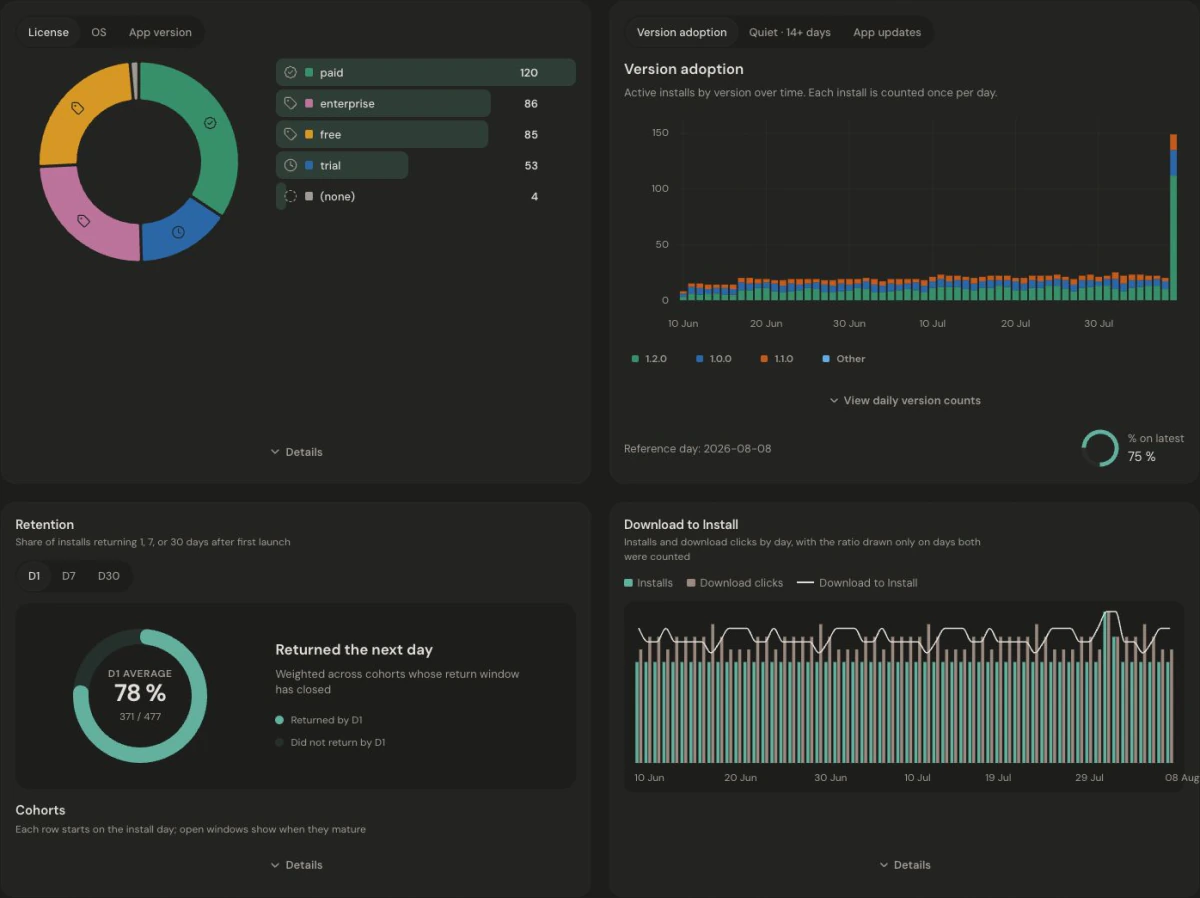
Website visits and app installs are not joined at the individual or marketing-channel level. Download to Install compares period totals; it is not a person-by-person conversion funnel. Read the app metric definitions.
Make the move
Export your Plausible site as a ZIP of CSV reports. In Jelto, open Settings → Privacy & data → Imports, preview the export, and review its timezone and cutover before importing. Verify a known historical day against the source export.
Import Plausible historyBefore you choose
Yes. Plausible revenue tracking is part of its Business offering. Compare the managed plan that includes the features you use with Jelto’s pageview and active-install allowances. Community Edition has a different feature set and requires your own infrastructure.
Jelto supports daily aggregates from a Plausible site export. Preview the ZIP to see the supported reports, skipped rows, and warnings. Importing aggregates does not reconstruct visitor journeys, ordered funnels, or visitor-level revenue attribution.
No. You can use Jelto for a website alone and add an app later. The desktop SDKs are useful when your product also runs on macOS, Windows, or Linux.
Cookieless is the default. Cookie mode and attribution memory are optional, explicit choices with their own disclosure and consent implications.
Compare Umami’s website behavior tools and self-hosting with Jelto’s website and desktop reporting.
Compare simple website reporting with a dashboard that also covers app adoption and retention.
Compare flexible website analytics and integrations with a dedicated view of desktop adoption.
Start with a website, a desktop app, or both.
14 days. No credit card required.