
Choose Jelto if…
- You need active installs and version adoption for a desktop product.
- You want website and app reporting in a managed dashboard.
- You want provider payments and aggregate channel revenue alongside product activity.
Umami alternative
From your website to your next app release.
Umami combines website traffic, behavior, conversions, and revenue, with cloud and self-hosted options. Jelto brings website and revenue reports together with dedicated desktop adoption and retention metrics.
14 days. No credit card required.
Side by side
| What you need | Jelto | Umami |
|---|---|---|
| Website analytics | Traffic, pages, campaigns, goals, and website visit funnels. | Traffic, campaigns, behavior, and custom dashboards called boards. |
| Desktop apps | Swift, Electron, Tauri, and .NET SDKs. Active installs, version adoption, and retention. | The documented product focuses on website visitors, sessions, and events. |
| Goals & funnels | Registered events and ordered steps within a website visit. | Goals, funnels, journeys, cohorts, and retention reports in the current documentation. |
| Revenue | Stripe, Lemon Squeezy, Polar, and a Payments API. Aggregate channel attribution needs checkout setup. | Event values and revenue reports, with attribution analysis. |
| Collection choices | Cookieless by default. Cookie mode and attribution memory are optional. IP addresses are never stored. | Cookieless collection without automatic personal-data collection or cross-site tracking. |
| Hosting | Managed Jelto service, with your website and desktop reports in one dashboard. | Managed Umami Cloud or an open-source self-hosted installation. |
| Pricing model | Starter and Growth plans include both pageviews and monthly active installs. Monthly or yearly billing.View Jelto pricing | Cloud plans and a self-hosted option. Infrastructure costs apply when running your own instance.View Umami pricing |
Reviewed September 8, 2026. Features and plans can change. Official sources
Example workflows
Two practical decisions, with steps from each product’s documentation.
You want a retention report, but first need to decide what a return means for your product.
How to decideChoose the report that matches the surface you want to understand. Umami’s website retention and Jelto’s installation retention do not count the same thing.
Add the desktop SDK and open Retention. Choose D1, D7, or D30 to see eligible installations that return on the measured day. Check cohort maturity before interpreting an unavailable result.
Jelto app usage guideRun Umami’s Retention insight for a month and year. Its chart groups website visitors by their first visit day and shows the percentage returning on subsequent days.
Umami retention documentationYour application knows the purchase amount and you want to report revenue consistently.
How to decideUmami fits event-based revenue collection, including a self-hosted setup. Jelto fits a managed workflow with supported payment connections and app reporting.
Use a supported payment connection or the Payments API, then verify payment receipt and checkout attribution separately. Read revenue and purchase totals in the channel report.
Jelto revenue guideSend an Umami event with revenue and currency properties. Choose the currency when creating the Revenue insight and check that your checkout sends the expected values.
Umami revenue documentationA look inside Jelto
For software teams, the next question is what happens after installation.
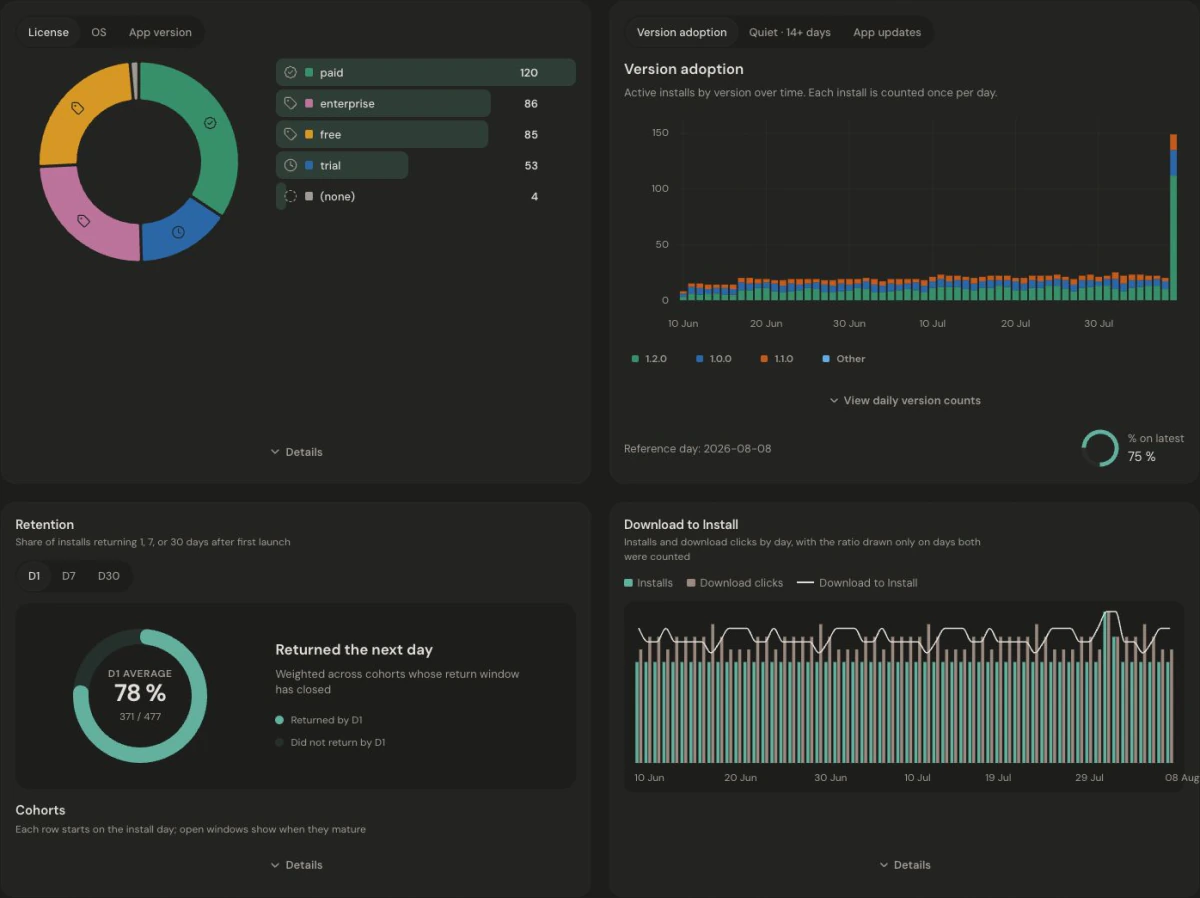
Website visits and app installs are not joined at the individual or marketing-channel level. Download to Install compares period totals; it is not a person-by-person conversion funnel. Read the app metric definitions.
Make the move
Identify the website events and conversion reports you need to keep. Install Jelto, register the corresponding goals, and verify current traffic. Preserve your Umami instance or exports for historical reporting; add the relevant Jelto SDK for desktop activity.
Keep access to your existing history. These steps set up new collection; they do not import your Umami reports.
Before you choose
Umami can be self-hosted, but you provide the infrastructure and maintain it. Compare those costs and responsibilities with a managed Jelto plan, including the desktop reporting you need. This comparison does not claim a measured cost saving.
Yes. Its current documentation includes events, goals, funnels, journeys, retention, session replays, heatmaps, and revenue reports. The choice depends on your reporting workflow, not just whether a tool counts pageviews.
There is no Umami database import in this setup. Keep your existing history available and use Jelto for new collection after verifying your installation.
Jelto has dedicated Swift, Electron, Tauri, and .NET SDKs and reports for installs, release adoption, and retention. If you use Umami through a custom integration, evaluate that collection model against the reports you need.
Two focused dashboards. See where desktop analytics and supported history imports make a difference.
Compare Matomo’s broad suite and hosting choices with Jelto’s focused software-product reports.
Compare a broad product platform with a focused view of traffic, desktop releases, and revenue.
Start with a website, a desktop app, or both.
14 days. No credit card required.