

Choose Jelto if…
- You want website and desktop reports in one managed product.
- You need dedicated release adoption and install retention views.
- You prefer a focused setup for traffic, product activity, and revenue.
Matomo alternative
A focused home for your product’s numbers.
Matomo offers a broad analytics suite with cloud and on-premise deployment options. Jelto brings website analytics, desktop adoption and retention, and revenue into a managed dashboard for software teams.
14 days. No credit card required.
Side by side
| What you need | Jelto | Matomo |
|---|---|---|
| Website analytics | Traffic, pages, campaigns, goals, and website visit funnels. | Broad traffic, campaign, segmentation, and conversion reporting. |
| Desktop apps | Swift, Electron, Tauri, and .NET SDKs. Active installs, version adoption, and retention. | Tracking APIs and SDK integrations support applications beyond the browser. |
| Goals & funnels | Registered events and ordered steps within a website visit. | Funnels, flows, and conversion analysis; check the selected deployment and offering. |
| Revenue | Stripe, Lemon Squeezy, Polar, and a Payments API. Aggregate channel attribution needs checkout setup. | Ecommerce tracking and marketing attribution tools. |
| Collection choices | Cookieless by default. Cookie mode and attribution memory are optional. IP addresses are never stored. | Configurable collection, including cookieless tracking and anonymisation options. |
| Hosting | Managed Jelto service, with your website and desktop reports in one dashboard. | Matomo Cloud or a self-managed on-premise installation. |
| Pricing model | Starter and Growth plans include both pageviews and monthly active installs. Monthly or yearly billing.View Jelto pricing | Cloud plans or an on-premise setup. Check hosting, support, and feature costs for your deployment.View Matomo pricing |
Reviewed September 8, 2026. Features and plans can change. Official sources
Example workflows
Two practical decisions, with steps from each product’s documentation.
Your team must decide whether it needs its own infrastructure before choosing reports.
How to decideChoose Matomo On-Premise when running the installation yourself is a requirement. Jelto fits a managed website and desktop reporting workflow.
Create a product in Jelto’s managed service, install the website snippet, and verify collection. Add a desktop SDK for app reports. This comparison covers the managed service.
Jelto quickstartFor Matomo On-Premise, check the server requirements, deploy the application and database, and plan updates and backups. Matomo Cloud is a separate managed option.
Matomo On-Premise guideYou want to connect marketing performance with purchases from your store.
How to decideJelto fits aggregate channel revenue for a software product. Matomo suits a broader ecommerce reporting requirement, particularly within an existing Matomo deployment.
Connect supported payments and carry the channel label through checkout. Read revenue and purchase totals by source, channel, or campaign, alongside website traffic.
Jelto revenue guideEnable Matomo ecommerce tracking and configure the relevant store integration or tracking calls. Its ecommerce reports cover orders, products, and abandoned carts from the data you send.
Matomo ecommerce reporting guideA look inside Jelto
For software teams, the next question is what happens after installation.
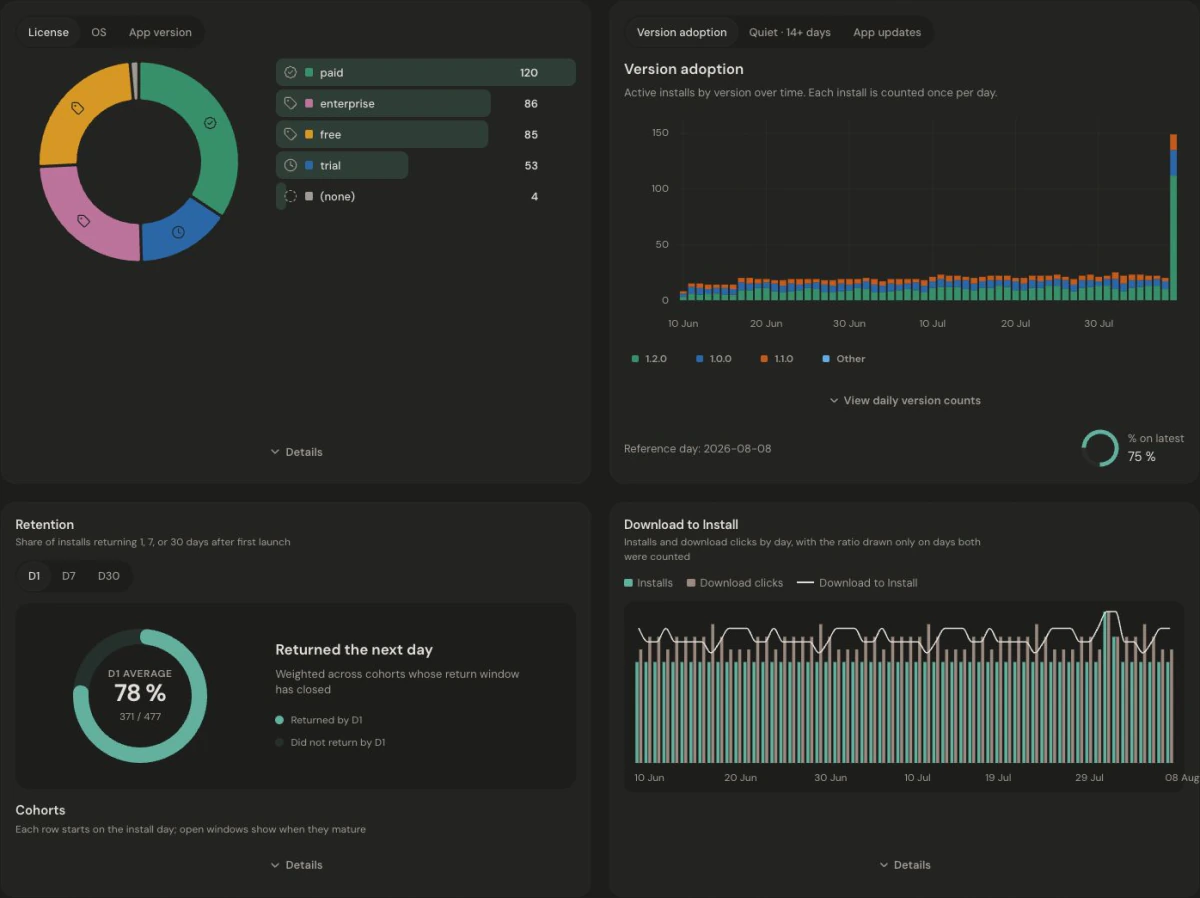
Website visits and app installs are not joined at the individual or marketing-channel level. Download to Install compares period totals; it is not a person-by-person conversion funnel. Read the app metric definitions.
Make the move
Review which Matomo reports, plugins, and tag-manager rules your site relies on. Add Jelto collection and recreate the goals you need. Keep your Matomo history and any operational integrations available while verifying the new reporting.
Keep access to your existing history. These steps set up new collection; they do not import your Matomo reports.
Before you choose
Include hosting, maintenance, backups, and any paid plugins or support your setup requires. Matomo Cloud and Jelto are managed alternatives with their own plans. Compare the deployment and features you actually need rather than a base price alone.
Evaluate the tools you actually use. Jelto covers website and desktop analytics and supported revenue workflows; this setup does not replace a tag manager, heatmaps, or session recordings.
Matomo explicitly offers an on-premise deployment. This comparison covers Jelto’s managed service, so Matomo is the relevant option when operating your own installation is a requirement.
This setup does not migrate a Matomo database into Jelto. Keep your historical reports available and verify new collection, timezone choices, and metric definitions separately.
Compare Umami’s website behavior tools and self-hosting with Jelto’s website and desktop reporting.
Compare Google’s broad analytics platform with a focused dashboard for websites and desktop software.
Compare flexible website analytics and integrations with a dedicated view of desktop adoption.
Start with a website, a desktop app, or both.
14 days. No credit card required.